NEW 0.49.1 Replies on LinkedIn, Facebook, YouTube & Instagram

Write better anywhere.
Prompt better in AI chats.

WriteFlow adds an AI writing assistant to every text box, from Gmail to LinkedIn, and a one-click prompt coach to ChatGPT, Claude and Gemini. It uses your own API key and has no WriteFlow server.

Free to use No account Try it without a key
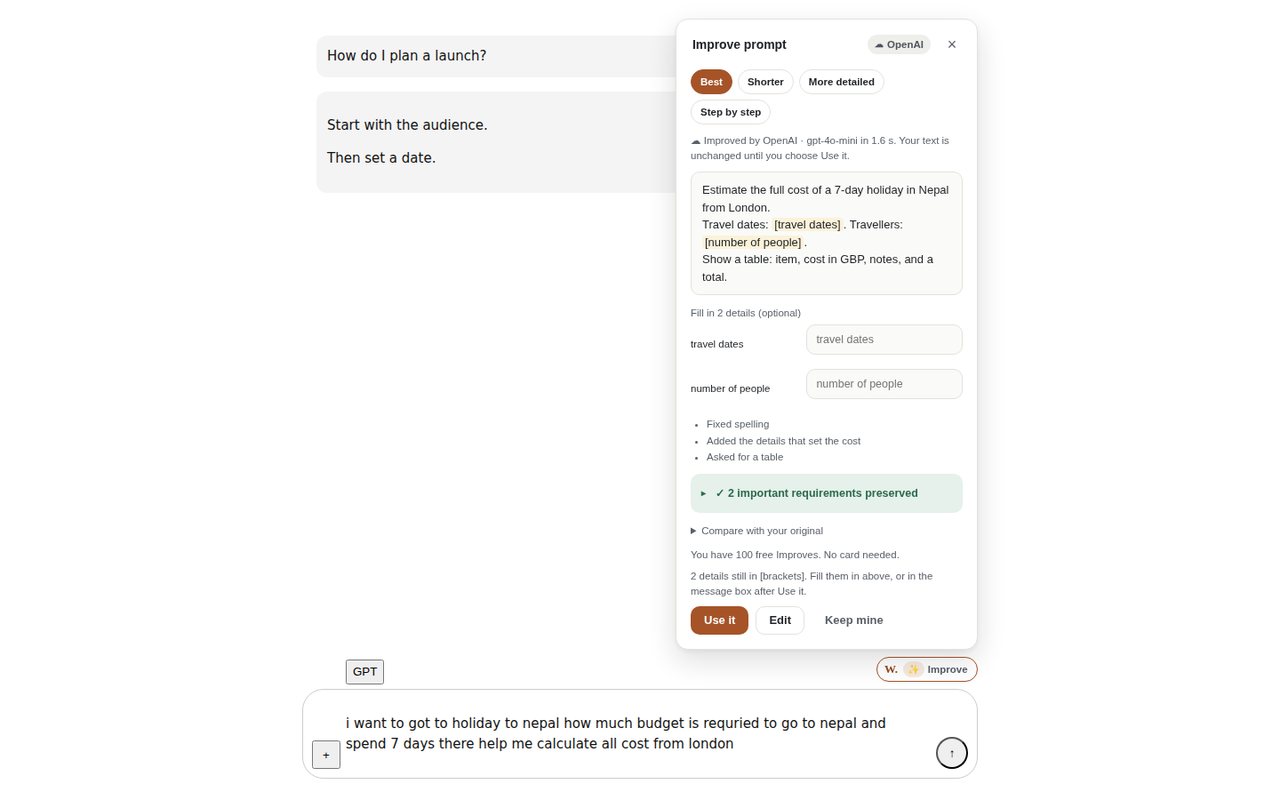
The WriteFlow Improve card beside an AI chat box, showing a vague travel-budget question rewritten into a clear prompt with the missing details marked.
A vague question becomes a clear prompt. Nothing is sent until you choose Use it.
What it does

One extension, three jobs

A thin, transparent layer between you and the AI provider you already use. You stay in control of every word that gets sent.

Write and reply anywhere

Click the W beside any text box.

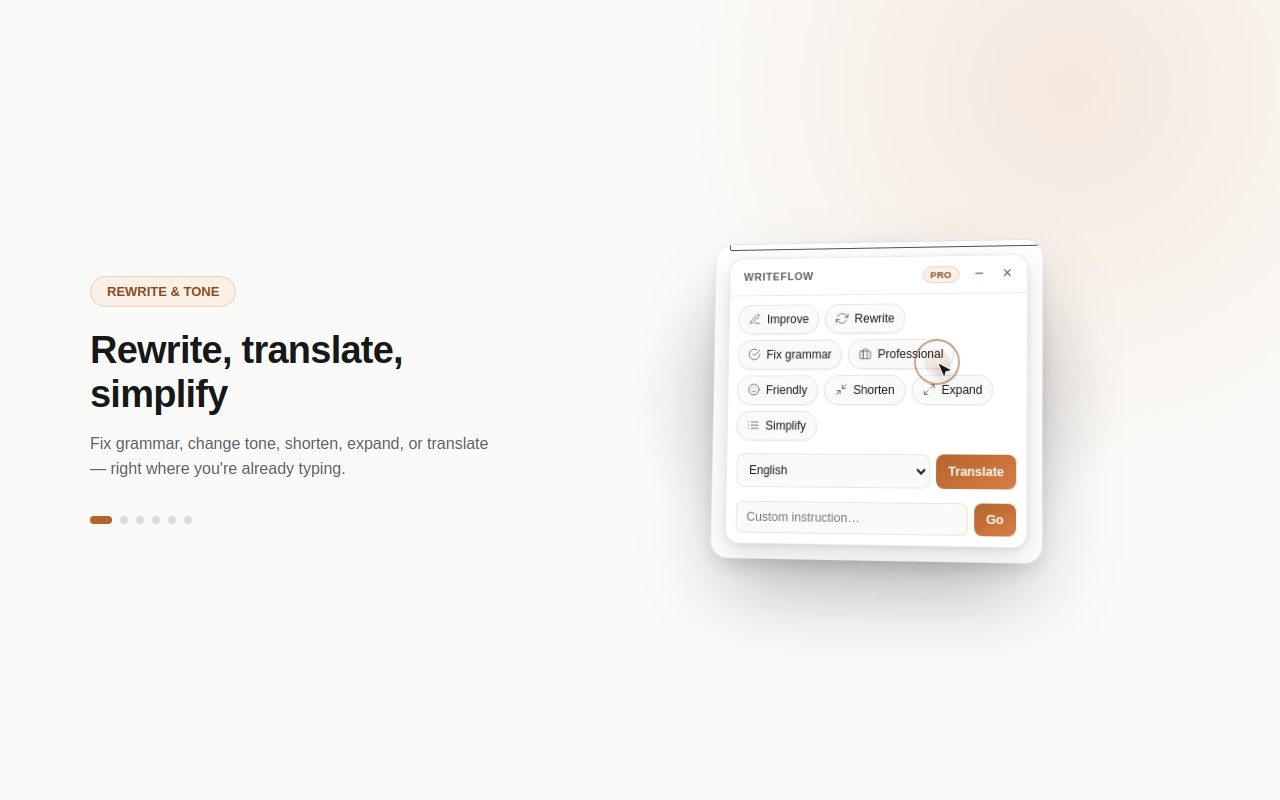
  • Rewrite, shorten, fix grammar, change tone, translate
  • Replies that read the post, comment or email thread you're answering
  • Write It For Me: describe it, get a draft that fits the site
  • Style DNA, so drafts sound like you
Gmail, Outlook, LinkedIn, X, Facebook, Instagram, YouTube, Reddit, Slack and more

Better prompts, fewer retries

A quiet helper beside the message box in AI chats.

  • ✨ Improve: one click turns a rough question into a clear prompt
  • Checks for missing details before you send
  • Runs simple tasks (math, sorting, dates) on your device
  • Suggests a cheaper or stronger model from the ones you enabled
ChatGPT, Claude and Gemini

Keep and check answers

The Review Workspace, on your device.

  • Save answers or any selected text with a right-click
  • Compare answers, verify claims, link sources
  • Record decisions with a full history
  • Export to Markdown or JSON, or back up and restore
Opens from the extension, stored in this browser only
See it in action

Every feature, in real screenshots

These are the extension running, not mockups. The AI-chat shots use a local test chat page.

Where it works

Built for the places you write

Tailored support on these sites, plus any other site you turn on from the popup.

ChatGPTClaudeGemini GmailOutlookLinkedInX FacebookInstagramYouTubeReddit SlackWhatsApp WebDiscordThreads TikTokBlueskyQuoraMedium SubstackTumblrPinterest

Social sites change their layouts often. When WriteFlow reads a post from nearby text, it shows you exactly what it read, and you can edit it before anything is sent.

Privacy by design

Your key. Your provider. Your device.

WriteFlow has no server of its own, so there's nowhere for your writing to go except the AI provider you chose.

Bring your own key

OpenAI, Anthropic, Google Gemini, Groq or OpenRouter. Your key stays in this browser.

Straight to your provider

Text goes from your browser to your provider, and only when you ask for a result.

Nothing auto-sent

WriteFlow never posts, sends or submits for you. You choose Use it, Insert or Copy.

No tracking

No ads and no data sales. Usage counts stay on your device and never include what you write.

Read the full Privacy Policy.

Free & Pro

Free for everyday writing

You pay your AI provider directly for what you use. Pro unlocks the extras.

Free

$0 · no account, no card
  • Rewrite, shorten, grammar and translate
  • Write It For Me, on every site
  • Basic social reply styles
  • 100 free ✨ Improves, no time limit
  • All prompt checks, Optimize and run-on-device
  • The full Review Workspace
Get WriteFlow

Pro

One Gumroad licence key
  • Everything in Free
  • Unlimited ✨ Improve, all modes
  • Smart Reply: reads the post and suggests angles for it
  • Every reply style, plus audience you can correct
  • Custom instructions and saved prompts
  • Style DNA that learns from your edits
  • A backup AI provider if the first one fails
Get Pro on Gumroad
What's new

Recent updates

WriteFlow updates itself through the Chrome and Edge stores.

0.49.1Latest

Social replies on LinkedIn, Facebook, YouTube and Instagram

Comment boxes now open reply options for the post. When WriteFlow reads the post from nearby text, it shows "Replying to…" with an Edit link. New-post boxes get options that fit the site.

0.49.0

100 free Improves, then Pro

Everyone gets 100 finished Improves with no time limit and no card. Only finished rewrites count, and everything else stays free.

0.48.0

✨ One-click Improve

Rewrite any prompt in ChatGPT, Claude or Gemini using prompt-engineering best practice, streamed as it's written. Choose Best, Shorter, More detailed or Step by step, then Use it, Edit or Undo. Shortcut: Alt+Shift+I.

0.46 – 0.47

Model advice and a quiet status indicator

Pick the models you have, and WriteFlow suggests a cheaper or stronger one for each request. It never switches silently, and automatic routing is opt-in.

0.38 – 0.45

Review Workspace: decisions, sources, comparison

Save tasks from chats, compare two answers, link sources and evidence, and keep a decision trail. You can set preferences by category too.

0.22 – 0.37

Spend less in AI chats

Prompt checks, Optimize with requirement protection, context health, continue in a new chat, retry prevention, task splitting, and a local usage and cost summary.

FAQ

Questions, answered honestly

Do I need an account or an API key to try it?

No account, ever. To try it without a key, leave Settings → Provider on Mock: every feature returns sample results and nothing is sent anywhere. For real results, add your own key. Google Gemini's free tier in Google AI Studio is the easiest place to start.

Which AI providers are supported?

OpenAI, Anthropic (Claude), Google Gemini, Groq and OpenRouter. You choose the provider and the models you want to use. Your key is stored only in this browser.

What is ✨ Improve, and how many can I use for free?

In ChatGPT, Claude or Gemini, type a prompt of six or more words and click ✨ Improve beside the message box, or press Alt+Shift+I. Your AI provider rewrites it into a clearer prompt, and you choose whether to use it. You get 100 free Improves with no time limit. Errors and cancelled ones don't count. After 100, Improve is part of Pro, and every other feature stays free.

Where does my text go?

When you ask for a result, the text you're working on, plus the post or email you're replying to for replies, goes directly from your browser to your AI provider, using your key. WriteFlow has no server and never sees it. Prompt checks run on your device. Details are in the Privacy Policy.

Reply options don't appear on a social site. What do I check?
  • Click inside the comment box first, then click the W button.
  • If WriteFlow can't read the post, the reply panel asks you to paste it. Your reply is still tailored.
  • Check that the site isn't turned off in the popup or in Settings → Disabled Sites.
  • Still wrong? Email the site and what you clicked, and the layout will be fixed.
Will WriteFlow send or post anything for me?

Never. Every result waits for you to choose Use it, Insert, Replace or Copy. Prompts in AI chats are never sent for you.

Is Pro a subscription?

Pro is unlocked with a licence key from Gumroad, and the Gumroad page shows the current price and terms. The key is checked with Gumroad at most once a week. If the check fails because you're offline, you keep Pro.

Generation fails or shows an error. What's wrong?

Most often the selected provider doesn't match the key. For example, an OpenAI key won't work with Anthropic selected. Also check that the key hasn't expired or run out of credit. See Support for more.
Early access

WriteFlow is new, so there are no customer reviews here yet. If you try it, real feedback, good or bad, is wanted at helloanishupreti@gmail.com. This space will show real reviews once they exist.